


Most fulfillment problems in small apparel shops don't come from bad decisions. They come from unmade decisions — the order sits in a queue because nobody knows who owns it, which store should fill it, or whether it's a pickup or a ship. By the time someone figures it out, the SLA window is half gone and the one medium left in the system just got sold on the floor.
This pack is the executable layer underneath that problem. If you already read the BOPIS and ship‑from‑store playbook, this is where strategy becomes a routing matrix, a RACI, a per‑order margin calculator, and the SLA copy you paste into your notification system. No philosophy. Just the assets.
I'll walk through each asset in the order you'd actually build it, because the sequence matters — your routing rules are worthless until your order state model and margin numbers exist first.
Start with the routing matrix, but build it backwards
Almost every small retailer makes the same mistake: they write routing rules based on where inventory is, not what the order costs them to fulfill. So a $38 tee gets shipped from Store B two states away because "that's where the stock was," eating $9 in labor and postage against maybe $16 of contribution margin.
The fix is a first‑match‑wins routing matrix. Rules are evaluated top to bottom, and the first rule that matches wins. No weighting, no scoring engine, no "fulfillment optimization algorithm" you can't debug at 4pm on a Saturday. Order of rules is your strategy.
Here's the logic in pseudocode you can hand to a developer or translate into your OMS rules engine:
``
function routeOrder(order):
    if order.type == "BOPIS":
        if store[order.pickupStore].hasStock(order.lines):
            return assign(order.pickupStore, mode="PICKUP")
        else:
            return routeexception(order, reason="BOPISNOSTOCK")

    # Ship-from-store path, first match wins
    for store in storesSortedBy(proximityToCustomer):
        if store.hasStock(order.lines)
           and store.capacityRemainingToday > 0
           and order.contributionMargin(store) >= MINMARGIN:
            return assign(store, mode="SHIP")

    # Split only if single-store fill impossible
    if canSplitAcrossStores(order):
        return assignSplit(order)

    return routeexception(order, reason="NOELIGIBLE_NODE")
``
Notice what's doing the work here:
-
BOPIS always checks the pickup store first and bails to an exception if stock isn't there. You never silently re‑route a pickup order to a different store without telling the customer.
-
Ship orders iterate by proximity but must also pass a capacity check and a minimum margin check before assignment.
-
Splitting is last, not first, because splitting an order doubles pick labor, packaging, and your chance of a partial‑shipment complaint.
Put this matrix in a shared, machine‑readable format — even a simple CSV your OMS or a lightweight automation layer can read — so the rules live in one place instead of in three managers' heads.
Routing matrix (human‑readable version):
| Priority | Condition | Action | Fulfillment mode |
|---|---|---|---|
| 1 | Order is BOPIS AND pickup store has all lines | Assign to pickup store | Pickup |
| 2 | Order is BOPIS AND pickup store missing lines | Route to exception queue | — |
| 3 | Nearest store has all lines AND capacity > 0 AND margin ≥ floor | Assign nearest store | Ship |
| 4 | Any store has all lines AND capacity > 0 AND margin ≥ floor | Assign that store | Ship |
| 5 | No single store, but combined stock exists | Split across two nodes | Ship (split) |
| 6 | Nothing matches | Exception queue → manager | — |
This works specifically for a 1–3 store operation because you don't have the order volume to justify a scoring model, and your staff needs rules they can reason about when something breaks. First‑match‑wins is auditable. If an order went to the wrong place, you look down the list and find exactly which rule fired.
Here's a visual you can use when explaining the flow to staff.
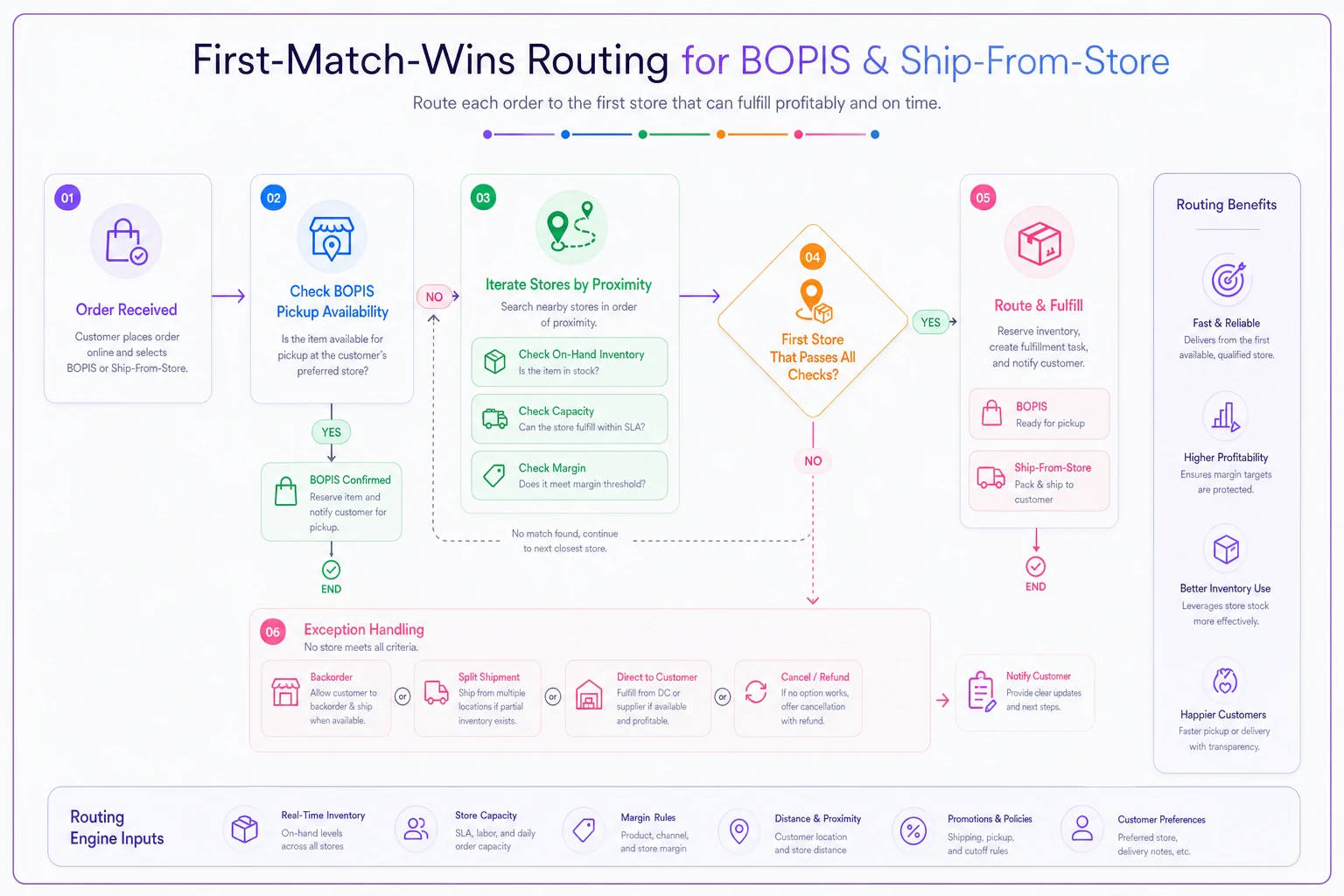
Use this in training so people can see the decision order, not just read it.
The per‑order contribution calculator (the part everyone skips)
You can't apply a MIN_MARGIN check if you don't know the margin. And "margin" here isn't your product markup — it's contribution after fulfillment cost, which is a very different number.
Take control of your clothing store operations.
Werzly helps you manage stock, process orders, and engage customers effortlessly.
- Unified inventory and order management
- Automated customer notifications
- Sales and stock analytics
No credit card required
Fulfillment cost gets treated as invisible overhead in a lot of small shops. It isn't. It's a per‑order line item that varies wildly depending on how the order is routed.
Here's the calculator logic. Drop this into Google Sheets with one row per order (or per SKU‑route combination):
Per‑order contribution = Revenue − COGS − Pick/pack labor − Packaging − Shipping − Expected return cost
A worked example for a single ship‑from‑store order:
| Line | Value |
|---|---|
| Order revenue | $74.00 |
| COGS | −$31.00 |
| Pick/pack labor (8 min @ $18/hr ≈ $2.40) | −$2.40 |
| Packaging (mailer + tissue + label) | −$1.15 |
| Shipping (zone 4, 1 lb) | −$8.60 |
| Expected return cost (22% return rate × $6 handling) | −$1.32 |
| Contribution margin | $29.53 |
Now run the same order as a split across two stores: pick/pack labor roughly doubles, you've got two packages, two shipping charges, and contribution drops to somewhere around $17–$19. Same revenue. Very different business.
This is why your routing matrix has a margin floor. For most apparel shops, setting MIN_MARGIN somewhere around $12–$15 for ship orders stops the bleed — below that threshold, you're often better off routing to BOPIS, offering a small "pick it up and get X" nudge, or holding the order for a consolidated fill.
SKU/margin routing rules worth hard‑coding:
-
Items under roughly $25 retail should strongly prefer BOPIS or consolidated shipping, never split.
-
High‑return categories (dresses, fitted outerwear, anything size‑sensitive) carry a higher expected return cost — bump their assumed return rate in the calculator so routing reflects reality.
-
Final‑sale and clearance SKUs can tolerate a lower margin floor because there's no return risk and you want them gone.
The calculator isn't a one‑time exercise. Labor and shipping inputs drift. Revisit the assumptions quarterly, or whenever your carrier rates change.
Order state data model and OMS metadata fields
Routing rules and SLAs both depend on knowing what state an order is actually in. Vague states are where orders go to die. "In progress" tells nobody anything.
Define a tight state machine. Here's a model that covers BOPIS and ship without getting overcomplicated:
``
RECEIVED → ROUTED → PICKED → PACKED →
   ├── (BOPIS) READYFORPICKUP → PICKED_UP → CLOSED
   └── (SHIP)  SHIPPED → DELIVERED → CLOSED

Exception branches:
   ANY → EXCEPTION → (re-ROUTED or CANCELLED)
``
Each state transition should be timestamped. That data is what makes your SLAs measurable and your KPIs real instead of guesses.
Minimum OMS metadata fields to carry on every order:
-
orderid,channel,fulfillmentmode(PICKUP / SHIP / SPLIT) -
assigned_node(which store) -
routingrulefired(which priority rule won — invaluable for debugging) -
state+state_timestampfor each transition -
sladueat(computed at ROUTED based on mode) -
contribution_margin(from the calculator, snapshotted at routing) -
exception_reason(nullable) -
customer_contact(email + SMS)
Ensure
routingrulefiredis recorded at routing for easy debugging.
That routingrulefired field is the one people forget and later wish they had. When a manager asks "why did this go to Store C," you want a field that answers it, not a reconstruction.
RACI and the shift workload plan
A routing matrix doesn't pick, pack, or call a customer. People do. And in a 1–3 store setup, the same person is often ringing up a walk‑in and packing a ship order in the same ten minutes — which is exactly how SLAs get missed.
RACI for a small‑store fulfillment operation:
| Task | Responsible | Accountable | Consulted | Informed |
|---|---|---|---|---|
| Monitor new order queue | Shift lead | Store manager | — | Owner |
| Pick order | Floor associate | Shift lead | — | — |
| Pack + QC | Floor associate | Shift lead | — | — |
| BOPIS handoff to customer | Front associate | Shift lead | — | — |
| Clear exceptions | Store manager | Store manager | Owner | — |
| Daily cap / capacity call | Store manager | Owner | — | Shift lead |
The non‑obvious thing here: exceptions must be owned by one role, not "whoever's free." When exceptions are everyone's job, they're nobody's job, and that's how a 4‑hour SLA quietly becomes a 9‑hour reality.
On shift workload — designate windows, not constant attention. Trying to fulfill orders continuously while running a floor doesn't work. Instead: a fulfillment sweep at open, one mid‑day, one two hours before carrier pickup. Each sweep clears the queue to zero. Between sweeps, new orders accumulate but don't create chaos. This batching alone fixes most "we forgot about it" misses.
SLAs, notification templates, and manager scripts
Your SLA is a promise with a clock. Write it down, compute sladueat automatically, and give staff the exact words to use.
Sample SLA definitions:
-
BOPIS Ready within 2 hours during open hours; held 7 days; customer notified at READY and at day‑5 reminder.
-
Ship‑from‑store Picked and packed same day if ordered before 1pm local; otherwise next business day. Tracking sent at SHIPPED.
Notification templates to have ready:
BOPIS ready (SMS): > Good news! Your order #{{orderid}} is ready for pickup at {{storename}}. We'll hold it until {{hold_until}}. Bring your ID and this text. See you soon!
BOPIS delay / exception (SMS): > Quick update on order #{{order_id}}: one item needs an extra day. We can (1) hold the full order until tomorrow, (2) ship the item to you free, or (3) refund that line. Reply 1, 2, or 3 and we'll sort it right away.
Ship confirmation (email subject + body): > Subject: Your order is on its way 📦 > Your order #{{orderid}} shipped today via {{carrier}}. Track it here: {{trackingurl}}. Expected delivery: {{eta}}.
Signage for the pickup counter: > ONLINE PICKUP HERE — have your confirmation text ready.
Manager script for a substitution call: > "Hi {{name}}, this is {{store}} calling about your pickup order. The {{item}} in the size you ordered just sold on our floor before we caught it — I'm sorry about that. I can get you the same style in {{alt}}, ship your size free from our other location by {{date}}, or refund it. Which works best?"
Scripts matter more than they look. The difference between a one‑star review and a loyal customer is often whether the associate had words ready when something went wrong, or had to improvise under pressure.
Pick / pack / packaging checklists
Pick checklist:
-
[ ] Pull pick ticket; confirm SKU + size + color against the label, not the hanger tag
-
[ ] Scan each item to the order (catches the medium‑for‑small swap before it ships)
-
[ ] Inspect for floor damage, deodorant marks, missing buttons
-
[ ] Stage in a labeled bin by order ID
Pack checklist:
-
[ ] Match staged items to order; scan to PACKED
-
[ ] Remove sensor tags / security devices (the #1 BOPIS complaint)
-
[ ] Fold to brand standard; tissue + sticker
-
[ ] Include return slip / QR for ship orders
-
[ ] Print and apply correct carrier label; confirm weight band
The sensor‑tag line deserves emphasis. A pickup customer who gets home and finds a hard tag still attached is a guaranteed return trip and an annoyed review. Build it into the checklist so it's never just assumed.
Capacity planning math and daily caps
You can only route to a store that has capacity. So you need a number.
If one associate can pick and pack an order in about 8 minutes, and you've allocated roughly 2 hours of fulfillment time across a day's sweeps, that's:
``
120 minutes ÷ 8 min/order ≈ 15 orders/day/associate
``
With a floor that can't spare a second person, your realistic daily cap per store lands around 12–15 ship orders plus BOPIS, not 40. When you exceed the cap, the routing matrix should stop assigning to that node (capacityRemainingToday > 0 fails) and route elsewhere or into a hold queue — before you've over‑promised.
Set the cap honestly based on your actual staffing, then watch your SLA miss rate. If misses climb as you approach the cap, the cap's too high.
Exception scripts and the returns tie‑in
Exceptions are the whole game. A clean routing matrix with no exception plan still fails on the first oversold medium.
The four exceptions you must have a scripted answer for:
-
BOPIS item sold on floor before pick → substitution call script (above), or free ship of correct size.
-
Ship order, no eligible node → notify customer with realistic ETA or offer refund; log
NOELIGIBLENODEfor inventory review. -
Damaged on pick → pull from that node, re‑route to next eligible store, flag the unit for markdown.
-
Customer no‑show on BOPIS → day‑5 reminder, day‑7 restock, auto‑refund.
Returns connect right back into this. A ship order that comes back should re‑enter inventory at the receiving store, not the shipping one, and the state model needs a RETURNED → RESTOCKED path so the unit becomes routable again instead of vanishing into a back‑room bin.
Tech / integration checklist
Before you flip any of this on:
-
[ ] OMS or POS exposes real‑time per‑store stock (not nightly batch)
-
[ ] Order state model implemented with timestamps
-
[ ] Routing rules stored as editable CSV/config, not buried in code
-
[ ]
routingrulefiredandcontribution_marginfields captured -
[ ] SMS + email templates wired to state transitions
-
[ ] Carrier label printing works at every fulfilling store
-
[ ] Exception queue visible to the accountable role
-
[ ] A reporting export for the KPIs below
Where a lightweight business management platform earns its keep is in quietly connecting these pieces — reading the routing CSV, firing the right notification on each state change, and surfacing the exception queue to one owner — so your staff spend their attention on customers instead of chasing which order is where. The point isn't automation for its own sake; it's that the rules you wrote actually get applied the same way every time, even on a chaotic Saturday.
KPI definitions and a 30/60/90 tuning plan
Track these, and only these, at first:
-
SLA attainment % — orders fulfilled within promised window
-
Average contribution per order — is routing protecting margin?
-
Split rate % — climbing splits = an inventory or rule problem
-
Exception rate % and top exception reason
-
BOPIS no‑show %
30 days: Run the matrix as written. Don't tune yet — collect data. Watch SLA attainment and exception reasons. Most shops find out their real bottleneck is the oversold‑on‑floor exception, not shipping.
60 days: Tune the margin floor and daily caps based on actual numbers. If splits are high, tighten stock accuracy at the source. If one store eats all the exceptions, rebalance proximity rules.
90 days: Lock in the refined rules, then focus on BOPIS attainment and the no‑show reminder cadence. By now the routing CSV should be stable and your average contribution per order should be visibly healthier than the "ship from wherever" baseline you started with.
When this pack makes sense — and when it doesn't
It makes sense when you're running real omnichannel volume across 1–3 stores, losing margin to split shipments or long‑distance fills, and SLA misses are generating returns and complaints.
It's overkill when you're a single store with a handful of online orders a week. At that volume, a shared spreadsheet and one person who owns fulfillment beats any rules engine. Don't build the matrix before you have the problem.
Who should NOT start here: if your per‑store inventory counts are unreliable, fix that first. Every routing rule assumes hasStock() tells the truth. Garbage stock data turns a clean matrix into a split‑shipment and exception machine, and no amount of SLA copy will save you.
The whole pack comes down to one idea: fulfillment decisions in a small apparel shop fail when they're improvised under pressure. Write the rules once, put the margin math behind them, name who owns the exceptions, and give your people the exact words for when stock sells out from under an order. That's the difference between omnichannel being a margin leak and being a reason customers keep coming back.
Ready to elevate your apparel business?
Join 2,000+ retailers using Werzly to streamline operations, increase sales, and deepen customer loyalty.