

Most clothing store owners schedule staff based on gut feeling and whoever's available. They text employees on Sunday nights, scramble when someone calls out sick, and wonder why their labor costs swing wildly between 18% and 35% of sales week to week.
The real damage happens slowly. Your best salesperson burns out from constantly covering shifts. New hires quit after three weeks because they're either overwhelmed or bored. Customer service tanks during unexpected rushes while you're overstaffed during dead periods. Labor planning for small apparel stores isn't just about filling shifts—it's about building a system that scales.
A boutique in Denver was hemorrhaging around $4,800 monthly in unnecessary overtime because their manager scheduled based on "feeling busy" rather than actual traffic patterns. Another shop in Austin lost two experienced associates in one month after repeatedly calling them in on days off. The owner couldn't figure out why turnover kept climbing until we mapped their actual scheduling chaos against employee availability.
The difference between stores that struggle with staffing and those that don't comes down to having a repeatable framework. Not complex workforce management software—just clear templates, simple matrices, and a weekly routine that takes 20 minutes.
Why traditional retail scheduling breaks down for small apparel operations
Small clothing stores face a unique staffing challenge. Unlike restaurants with predictable meal rushes or service businesses with appointments, apparel retail swings unpredictably. A rainy Tuesday might be dead while a random Wednesday afternoon explodes with traffic because of a nearby event you didn't know about.
The typical approach makes things worse. Owners look at last week's schedule, make minor tweaks, and hope for the best. When sales dip, they panic-cut hours. When things pick up, they throw bodies at the floor without thinking about skill mix or efficiency. This reactive cycle creates three specific problems that compound over time.
First, coverage gaps emerge in ways you don't immediately notice. Your stockroom becomes a disaster zone because the one person who knows the receiving process only works mornings. Fitting rooms pile up with returns because nobody scheduled overlapping coverage during peak try-on times. These hiccups seem minor individually but collectively destroy conversion rates.
Second, knowledge concentration becomes dangerous. Emma knows everything about denim fits but only works weekends. Marcus handles all online order fulfillment but he's part-time. When either calls out, operations stumble. The owner ends up doing everything themselves, which defeats the purpose of having employees.
Third, the financial impact stays hidden until it's too late. You might track total labor cost as a percentage of sales, but that aggregate number masks inefficiency. Having three people standing around from 2–4 PM while being understaffed from 5–7 PM can average out to an acceptable labor cost—but you're still losing sales and wasting payroll.
These problems intensify as stores grow. What works with three employees falls apart with eight. The casual system that handled one location becomes chaos across multiple stores.
Building shift templates based on actual traffic patterns, not assumptions
Effective staffing starts with understanding your actual traffic flow, not what you assume happens. Most owners think they know their busy times, but memory plays tricks. That Thursday that felt slammed might have had fewer transactions than the Tuesday you thought was slow.
Take control of your clothing store operations.
Werzly helps you manage stock, process orders, and engage customers effortlessly.
- Unified inventory and order management
- Automated customer notifications
- Sales and stock analytics
No credit card required
Pull transaction timestamps from your POS for the last 8 weeks. Don't look at sales dollars—look at transaction count by hour. A $400 coat sale at 11 AM doesn't mean you need double coverage all morning. Twenty $30 transactions between 5–6 PM tells you more about actual staffing needs.
Group your hourly transaction data into bands:
Traffic Band Framework:
-
Band A (Rush)
12+ transactions per hour
-
Band B (Steady)
7–11 transactions per hour
-
Band C (Moderate)
3–6 transactions per hour
-
Band D (Slow)
Under 3 transactions per hour
Map these bands across your typical week. You'll probably find patterns you didn't expect. Maybe Saturday mornings are actually Band C until noon. Maybe Wednesday evenings consistently hit Band A between 5–7 PM because of the yoga studio next door.
Once you know your bands, build shift templates around them:
Band A Template (Rush):
-
Floor coverage
3 minimum (1 register, 1 fitting room, 1 float)
-
Backroom
1 dedicated if receiving day
-
Shift overlap
30 minutes minimum
-
Skills required
At least 2 with full product knowledge
Band B Template (Steady):
-
Floor coverage
2 (both register-trained)
-
Backroom
Floating coverage as needed
-
Shift overlap
15 minutes
-
Skills required
At least 1 with full product knowledge
Band C Template (Moderate):
-
Floor coverage
1–2 depending on store layout
-
Backroom
Combined with floor duties
-
Shift overlap
Not required
-
Skills required
Basic register and product knowledge
Band D Template (Slow):
-
Floor coverage
1 (manager or senior associate)
-
Focus
Projects, merchandising, online orders
-
Use for training new hires with supervision
Here's a quick workflow visualization of taking POS transaction counts into traffic bands and generating shift templates.
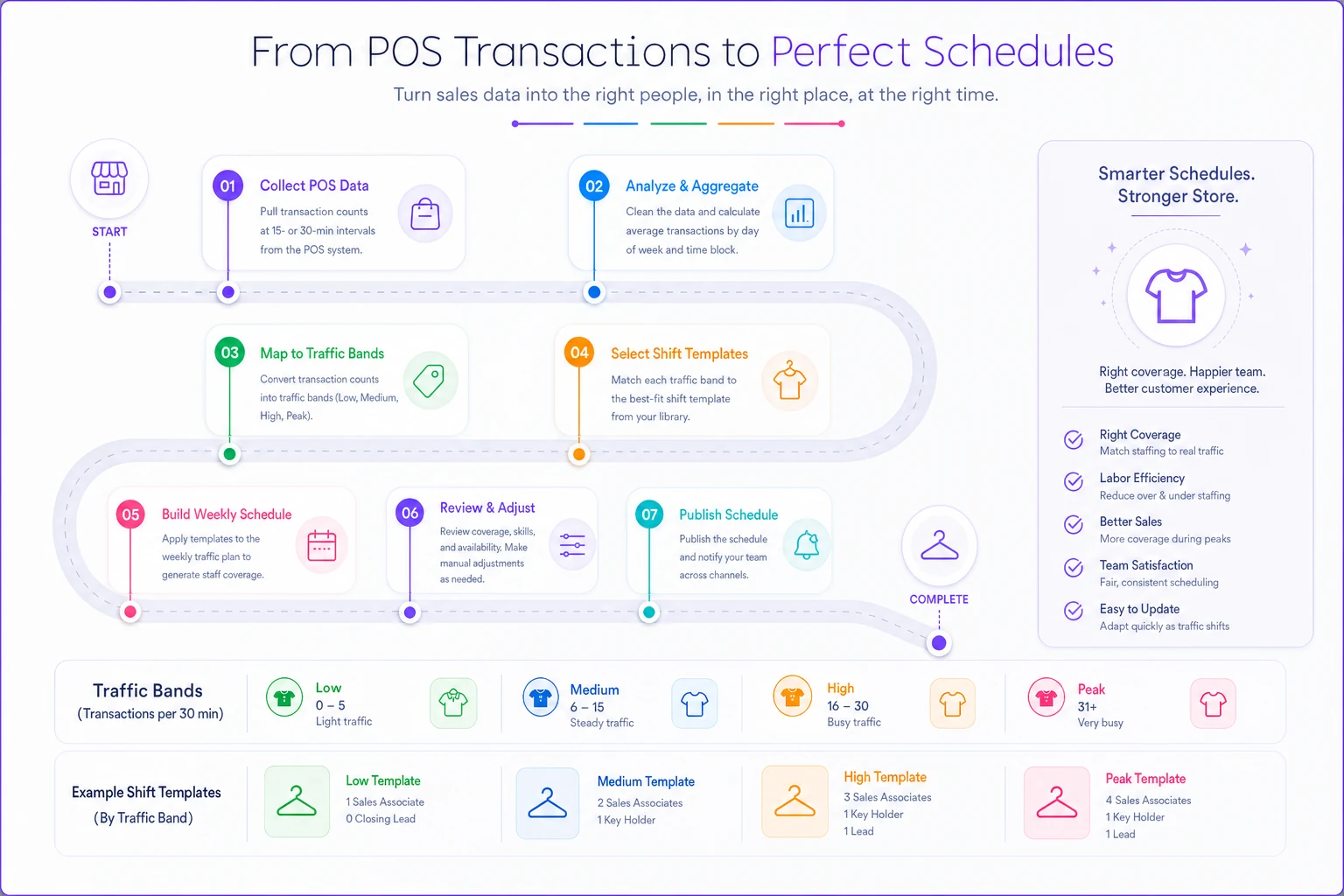
The value here is that you pre-build these templates into weekly schedules. Instead of starting from scratch each week, you have a framework. Monday 10 AM–2 PM is always Band D, so you schedule one senior person for projects. Saturday 1–5 PM is Band A, so you automatically slot three people with the right skill mix.
This also adapts to seasonal changes without rebuilding everything. During the holidays, your Band B periods might shift to Band A. In January, Band C becomes Band D. The framework stays constant—only the band assignments change based on recent data.
The cross-training matrix that prevents single points of failure
Every small apparel store has that one employee who knows how to process returns in the system, or the only person who understands the vintage denim inventory. When they're out, everything grinds to a halt. Cross-training isn't about making everyone experts at everything—it's about eliminating dangerous dependencies.
Build a simple matrix that maps essential tasks against your team. Start with the tasks that actually break operations when nobody knows how to do them.
Essential Task Categories:
Opening/Closing Procedures:
-
Alarm systems and safe procedures
-
Register opening and cash reconciliation
-
Light switches and music systems (surprisingly often forgotten)
Transaction Processing:
-
Standard sales and returns
-
Multi-tender transactions
-
Online order fulfillment
-
Special orders and holds
Product Knowledge:
-
Fit expertise by category
-
Fabric care and alterations info
-
Inventory locations and stockroom organization
Operational Tasks:
-
Receiving and processing shipments
-
Markdown execution
-
Display changes and merchandising
-
Inventory transfers and damages
Use a simple scoring system across all of these:
-
0 = No knowledge
-
1 = Can do with supervision
-
2 = Can do independently
-
3 = Can train others
Here's what a functional matrix looks like for a 5-person team:
| Task | Emma | Marcus | Sofia | Jake | Riley |
|---|---|---|---|---|---|
| Register/Returns | 3 | 2 | 3 | 1 | 2 |
| Online Fulfillment | 2 | 3 | 1 | 0 | 2 |
| Receiving | 3 | 1 | 2 | 2 | 0 |
| Denim Knowledge | 3 | 1 | 2 | 3 | 0 |
| Opening Procedures | 3 | 2 | 3 | 0 | 1 |
The gaps jump out immediately. Only Marcus really knows online fulfillment. Riley can't open the store alone. Nobody besides Emma is fully comfortable with receiving. These are all single points of failure waiting to become actual problems.
Set a minimum coverage rule: every essential task needs at least two people at level 2 or higher. For critical tasks like opening procedures or register operations, aim for three. This isn't redundancy for its own sake—it's flexibility. When Emma takes vacation, operations shouldn't collapse.
Use slow periods (those Band D shifts) for cross-training. Pair Riley with Emma during a quiet Tuesday morning receiving session. Have Marcus shadow Sofia during returns processing. Document key steps for each task in simple one-page guides that live near the register.
Track progress monthly. As scores improve, scheduling gets easier. Instead of texting Emma frantically because a shipment arrived, you have three people who can handle it. The matrix also reveals promotion potential—Jake might be new, but if he's moving from 0s and 1s to 2s across multiple categories quickly, that tells you something useful.
The 20-minute weekly review that catches problems before they explode
Most staffing problems aren't sudden. They build over weeks until something breaks. The associate who eventually quits without notice probably showed signs of frustration for a month. The labor cost spike that shocked you in February was visible in January's numbers if you'd looked.
A focused weekly review prevents these surprises. This isn't another meeting—it's a 20-minute routine that connects staffing to actual store performance. Run it every Monday morning before building next week's schedule.
Week One Review Structure (7 minutes):
-
Labor cost as percentage of sales
-
Transactions per labor hour
-
Average transaction value by day
Compare against your targets. If labor hit 28% against a 22% target, dig into why. Was it low sales or over-scheduling? If transactions per labor hour dropped, were you overstaffed or was something else going on?
Look at the schedule versus what actually happened. Did the Wednesday closer leave early? Did you call someone in on Saturday? These adjustments tell you where your templates aren't matching reality.
Week Two Planning Check (8 minutes):
-
Review next week's schedule against your templates. Are you following the traffic band coverage you established?
-
Overlapping too many senior people during slow periods—you don't need three key holders working Tuesday morning.
-
Understaffing transition times. The 4–6 PM shift change often needs extra coverage as one person counts registers while another handles customers.
-
Forgetting non-selling tasks. Who's processing the Thursday shipment? When are markdowns happening? These need dedicated time, not "whoever's free."
-
Check individual hours and availability. Is Emma approaching overtime? Has Jake only gotten 12 hours when he needs 25? These imbalances create turnover.
Performance Connection (5 minutes):
This is where most stores miss the link. Compare staffing decisions to actual KPI performance. Did conversion rate drop on days with new staff? Are return rates higher when certain people work? These patterns matter.
Map out specific correlations:
-
Saturday's conversion was 22% with Emma and Marcus, but only 14% with Jake and Riley
-
Online order fulfillment averages 3.2 hours on Marcus's shifts, 5.5 hours on others
-
Customer complaints cluster around Tuesday evenings (understaffed Band B period)
Document actions from these insights. Maybe Jake needs more product training. Perhaps Tuesday needs Band A coverage instead of Band B.
Set three specific staffing adjustments for next week:
-
One coverage change (add/remove a person during specific hours)
-
One training priority (pair specific people for skill development)
-
One schedule experiment (try a different coverage pattern, track results)
The review gets faster each week as patterns emerge. After a month, you'll spot issues immediately.
Scale patterns: How staffing complexity changes from 1 to 3 to 5 stores
The staffing system that works for a single boutique breaks when you open a second location. The careful balance you've built—where Emma covers mornings and Marcus handles afternoons—suddenly needs complete restructuring. Each growth stage requires a different operational approach.
Single Store Reality (3–8 employees):
At one location, staffing stays personal. You know everyone's strengths, availability, and quirks. Sarah can't work Tuesdays because of her daughter's dance class. David excels at denim but struggles with the register. You can accommodate these patterns because the team is small enough to track mentally.
Scheduling probably happens through group texts or a shared calendar. Cross-training happens organically. The owner fills gaps personally when needed. This works until it doesn't—usually around 6–7 employees, when you suddenly can't remember everyone's availability and shift swaps become genuinely confusing.
Three Store Complexity (15–25 employees):
With three locations, everything shifts. You can't personally cover gaps anymore. Each store needs its own key holder coverage. Transferring staff between locations for coverage becomes a logistics puzzle.
New problems emerge:
-
Store A is overstaffed while Store B desperately needs coverage
-
Your best salesperson works at the slowest location
-
Training consistency varies wildly between stores
-
Labor costs swing differently at each location
Build hub-and-spoke coverage models. Designate your highest-volume store as the hub with slightly deeper bench strength. These become your floating coverage pool. The satellite stores run leaner but can pull from the hub during planned events or emergencies.
Create store-specific templates that acknowledge different traffic patterns. Your downtown location might peak during lunch hours while the mall store surges on weekends. Don't force identical schedules across different realities.
Implement transfer protocols:
-
Minimum 48-hour notice for non-emergency transfers
-
Travel time compensation clearly defined
-
Maximum 2 transfers per person per month
-
Skills verification before transfer (not everyone knows every store's layout)
Five Store Operations (35–50 employees):
At five stores, you're managing close to 2,000 labor hours weekly. Individual accommodation becomes impossible. Systems handle the complexity.
District-level thinking emerges. Group stores by geography or traffic pattern. Maybe Stores 1–3 are urban locations with similar patterns, while Stores 4–5 are suburban with different peaks. Create templates for each cluster.
Develop a bench strength model:
-
Core Staff (60% of hours)
Consistent schedules, Store-specific assignments, Primary knowledge holders
-
Flex Staff (30% of hours)
Variable schedules, Comfortable at 2–3 stores, Fill coverage gaps
-
Float Pool (10% of hours)
Completely flexible, Know all locations, Premium pay for flexibility
The weekly review evolves into two tiers. Individual store managers run their 20-minute reviews. You run a 30-minute aggregate review looking at patterns across all stores. Technology becomes mandatory at this scale—but the underlying frameworks stay the same. Traffic bands, cross-training matrices, and weekly reviews still drive everything. They just execute through digital workflows rather than paper.
Common staffing mistakes that kill profitability (and simple fixes)
The most expensive staffing mistakes in apparel retail aren't obvious. They hide behind seemingly logical decisions that slowly drain profitability.
The "Fair Hours" Trap
Distributing hours evenly among part-time staff feels fair but destroys efficiency. Your top performer who could handle rush periods alone gets the same hours as the new hire who needs constant supervision. You end up scheduling two mediocre employees during crucial selling times instead of one strong associate.
The fix: create performance-based scheduling tiers. Top performers get first choice of shifts and guaranteed minimum hours. New hires get variable hours until they prove themselves. Customers deserve your best staff during peak times—that's not harsh, it's just honest.
Overtime Panic Leading to Understaffing
A manager approaches 38 hours on Wednesday. You panic about overtime and cut their Thursday shift. Now Thursday—typically a Band B day—runs with inexperienced coverage. Sales drop $800. You saved maybe $30 in overtime premium but lost $240 in margin.
Build overtime buffers into planning. If managers are scheduled for 35 hours, you have a 5-hour buffer for unexpected needs. If they consistently hit 40+, either hire additional key holders or move them to salary. The gray zone between 37–42 hours creates more problems than it solves.
The Experience Imbalance
Friday night: three experienced associates working together, basically competing for customers. Saturday afternoon: two new hires struggling through rush period alone. This happens when you schedule based on availability rather than strategic mixing.
Every shift needs an anchor—someone with complete product knowledge and operational authority. During Band A periods, you need at least 50% experienced staff. Never schedule multiple new hires together unless it's specifically for group training during slow periods.
Ignoring Prep and Cleanup Time
The schedule shows perfect coverage from open to close. But nobody's scheduled to arrive 15 minutes early for opening prep. The closer leaves exactly at 9 PM with registers uncounted and fitting rooms unchecked. These invisible tasks either don't happen or cause unauthorized overtime.
Build buffers explicitly:
-
Openers arrive 15 minutes before unlock
-
Closers stay 20 minutes after lock
-
Shift changes overlap by 10 minutes minimum
-
Shipment days get 2 extra hours for processing
The False Economy of Minimum Coverage
Running with absolute minimum coverage seems cost-effective until you calculate opportunity cost. One person during Band C periods might handle basic transactions, but they can't provide fitting room service, process returns, answer phone calls, and maintain displays at the same time.
Calculate your break-even point. If adding one person for 4 hours costs around $65 in wages plus taxes, you only need one additional $220 sale to cover it at 30% margin. During a 4-hour period, that second person probably enables several additional sales through better service and faster checkout.
The Burnout Schedule
Your best associate always says yes to extra shifts. Your strongest manager never takes time off. You lean on these people until they suddenly quit, leaving massive knowledge gaps.
Institute maximum scheduling rules:
-
No more than 6 consecutive days for anyone
-
Maximum 10 shifts per 14-day period
-
Mandatory one full weekend off per month
-
Required vacation usage (don't let it stack up)
Replacing an experienced associate costs roughly $3,000–4,000 in recruiting, training, and lost productivity. These protections aren't soft—they're pure economics.
Technology and frameworks working together for operational efficiency
The best staffing system combines simple frameworks with lightweight automation. You don't need enterprise workforce management software, but pure manual scheduling won't scale either.
Start with the frameworks—traffic bands, cross-training matrix, weekly review routine. These create the logic layer. Then add operational software that executes that logic without constant manual adjustment. This isn't about replacing human judgment. It's about removing repetitive work so you can focus on decisions that actually matter.
A properly configured platform can automatically suggest schedules based on your traffic bands. It knows Saturday 1–5 PM needs Band A coverage with specific skill requirements. Instead of building from scratch each week, you review and adjust an intelligent first draft. The system remembers that Emma requested off third Saturdays and Marcus can't work past 6 PM on Thursdays.
The cross-training matrix becomes a living document. As employees complete training tasks, their scores update. When scheduling, the system flags dangerous coverage gaps—like scheduling a shift with nobody above Level 2 for returns processing. These warnings prevent small oversights from becoming operational disasters.
Your weekly review shifts from manual number-crunching to pattern recognition. Instead of calculating labor percentages yourself, you review dashboards that flag anomalies. Tuesday's labor cost spiked 8% above template—the system shows you called in extra coverage for an unexpected shipment. Now you can decide if that was necessary or if receiving procedures need adjustment.
AI automation helps by surfacing patterns that are hard to catch manually. Maybe conversion rates consistently drop when certain employee combinations work together. Maybe labor costs run slightly higher on shifts managed by specific key holders who tend toward overstaffing. These insights would take hours to find manually.
For multi-store operations, AI-powered operational platforms become essential. They balance labor across locations, suggest transfers based on traffic patterns, and flag stores trending toward overtime problems. The same frameworks apply across all of it—traffic bands, cross-training requirements, performance metrics—but they execute across complexity no manual system could handle.
From reactive scrambling to predictable operations
Staffing and labor planning for small apparel stores doesn't have to be a weekly scramble. The difference between stores that constantly struggle with coverage and those that run smoothly isn't about having perfect employees or an unlimited payroll budget. It's about having systems that scale.
Shift templates based on traffic bands eliminate guesswork. Cross-training matrices prevent single points of failure that cripple operations when someone calls out. The 20-minute weekly review catches problems while they're still small and fixable.
These frameworks adapt as you grow. The traffic band concept that works for one store scales to five—you just apply it more systematically. The cross-training matrix that starts on paper becomes a digital scorecard. The weekly review that begins as a notebook exercise evolves into dashboard analysis.
Most importantly, this approach turns staffing from a necessary evil into a competitive advantage. While other stores scramble with coverage gaps and knowledge bottlenecks, you're optimizing performance. While they're texting frantically for shift coverage, you're developing talent systematically. While they wonder why labor costs keep climbing, you know exactly where every hour goes and what it produces.
Pick your busiest day next week and map the actual traffic pattern by hour. Build one shift template using the band framework. Create a simple skill matrix for your current team. Run your first 20-minute review next Monday. Start small, stay consistent, and watch how quickly the chaos turns into something predictable and profitable.
Ready to elevate your apparel business?
Join 2,000+ retailers using Werzly to streamline operations, increase sales, and deepen customer loyalty.