

A pop-up lives and dies by a completely different clock than your store. You get 2 to 4 days, sometimes just a weekend, to move a limited pile of inventory in a space you don't control, with a POS setup held together by a hotspot and hope. And when it's over, you have to figure out what actually sold, what walked out unpaid, and what needs to go back on the shelf at your main location.
Most small retailers treat pop-ups like a mini version of their store. That's the mistake. A pop-up is closer to a controlled inventory experiment with a hard deadline. The buying math is different, the SKU setup is different, and the reconciliation — the part everyone skips — is where the actual profit or loss gets decided.
This is the part nobody writes about honestly. So let's fix that.
The buying problem: you're guessing under a deadline
The classic pop-up buying mistake isn't buying too much. It's buying the wrong spread. You bring 40 units of a hero style and 6 units each of four supporting styles, and by Saturday afternoon you've sold out of two sizes in the hero and you're staring at 30 units of stuff nobody's touching — in a space you're paying daily rent on.
Why does this happen? Store-level buying assumes you can reorder. At a pop-up, you can't. There's no lead time, no transfer window, no "we'll get more Tuesday." Every unit you didn't bring is a sale you can't make, and every unit you brought and didn't sell is dead weight you have to haul back.
So the buying logic flips. Instead of buying to a reorder point, you buy to an allocation band — a min/max range per SKU that reflects how much floor time and shelf space that SKU actually deserves during a short window.
Allocation bands: how much to actually bring
An allocation band is just a floor and ceiling of units per SKU, set by the role that SKU plays at the event. The point is to stop yourself from over-committing to unproven styles and under-committing to proven sellers.
| SKU role | Allocation band (units) | Size spread | Notes |
|---|---|---|---|
| Proven hero (top seller from main store) | 24–40 | Deep on core sizes (M/L), thin on edges | This carries the event. Don't starve it. |
| Secondary sellers (2–4 styles) | 12–20 | Balanced | Support the hero, fill the rack |
| New/test styles | 6–10 | One size per, or core only | You're testing demand, not committing |
| Impulse/accessory | 15–30 | N/A | Low price, high attach rate at checkout |
| "Fill the table" volume | 20–40 | Whatever's cheap | Makes the space look full, drives foot traffic |
The band matters more than the exact number. If your hero's band is 24–40 and you only own 18 units, that tells you something: either pull from another location or accept you'll sell out early and lose upside. If a test style wants 6–10 and you're tempted to bring 25 "just in case," the band is the thing that stops you.
Quick sanity check on total volume: for a weekend pop-up with moderate foot traffic, plan to bring roughly 1.3x to 1.6x of what you realistically expect to sell. Below 1.3x and you'll have gaping holes in the rack by day two. Above 1.6x and you're paying to store and haul inventory that could've stayed home earning its keep.
The temporary SKU problem: your POS will lie to you
Here's the mess that ruins reconciliation before the event even starts. You're running on a stripped-down mobile POS — a tablet, a Square account, whatever's portable. And someone, usually in a rush the night before, creates quick SKUs like "Blue Tee" and "Jeans - Med" and "Misc $25."
Take control of your clothing store operations.
Werzly helps you manage stock, process orders, and engage customers effortlessly.
- Unified inventory and order management
- Automated customer notifications
- Sales and stock analytics
No credit card required
Then the event ends and you have no idea what "Misc $25" was. You sold 14 of them. Were those the dad hats? The scarves? Two different discounted tops? Your main store inventory says one thing, your pop-up POS says another, and now you're doing forensic accounting on a Sunday night.
The fix is boring and it works: temporary SKUs must map back to your master SKUs, one to one, before the event.
Temporary POS SKU best practices
-
Prefix every pop-up SKU. Use something like
PU-in front of the real SKU.PU-TEE-BLU-M. Now it's searchable, sortable, and obviously event inventory when you're cleaning up afterward. -
Never create a SKU at the event. If it wasn't set up in advance, it doesn't get scanned. A "one-off" SKU created live is a guaranteed reconciliation hole.
-
No open-price buttons for real product. "Misc $25" should only ever be used for genuinely uncatalogued items, and even then, log them by hand. Every open-price ring is a unit you can't trace.
-
Match the price to the master record, then adjust for the event once. Set your pop-up discount as a consistent rule (e.g., 10% off tag), not a manual override per transaction. Manual overrides are where margin leaks and where you can't tell later whether a discount was real or a mis-key.
-
Pre-print barcodes. If your master items already have barcodes, bring the scanner. Manual entry at a busy pop-up is where "M" becomes "L" and your size counts stop matching reality.
Prefixing SKUs with
PU-makes POS filtering and post-event matching trivial.
The pattern underneath all of this: a temporary SKU that can't be traced to a permanent one is inventory you've already lost track of. You just don't know it yet.
Staging packs: pack the event, not the products
Most stores pack a pop-up like they're moving apartments — throw everything in bins, sort it out on-site. Then you spend the first two hours of setup unpacking and cross-referencing instead of selling.
A staging pack is a pre-assembled, pre-counted unit built around how you'll actually run the event, not around how products are organized in your stockroom. Think of it as receiving in reverse — floor-ready bundles that go straight from box to rack.
How to build a staging pack
-
Pack by rack, not by style. If your pop-up floor plan has a hero rack, a secondary rack, and a table, build one pack per zone. Whoever's setting up grabs Pack A, and everything for the hero rack is in it, already on hangers if space allows.
-
Count and seal each pack with a manifest taped to the outside. The manifest lists every SKU and quantity in that pack. This becomes your opening count — the single most important number for reconciliation later.
-
Separate sellable stock from supplies. Bags, tissue, the card reader, tape, signage — separate pack, clearly labeled. Nothing derails a setup like tearing open three inventory boxes looking for the receipt printer.
-
Build a "replen" pack. Backup units for your hero styles, sealed and counted separately, so mid-event restocking doesn't get mixed into your on-floor count. When you break the replen seal, note the time and quantity. Now you have a running record instead of a mystery.
-
Photograph each packed rack manifest before you seal it. Ten seconds. Saves an hour when a number doesn't add up.
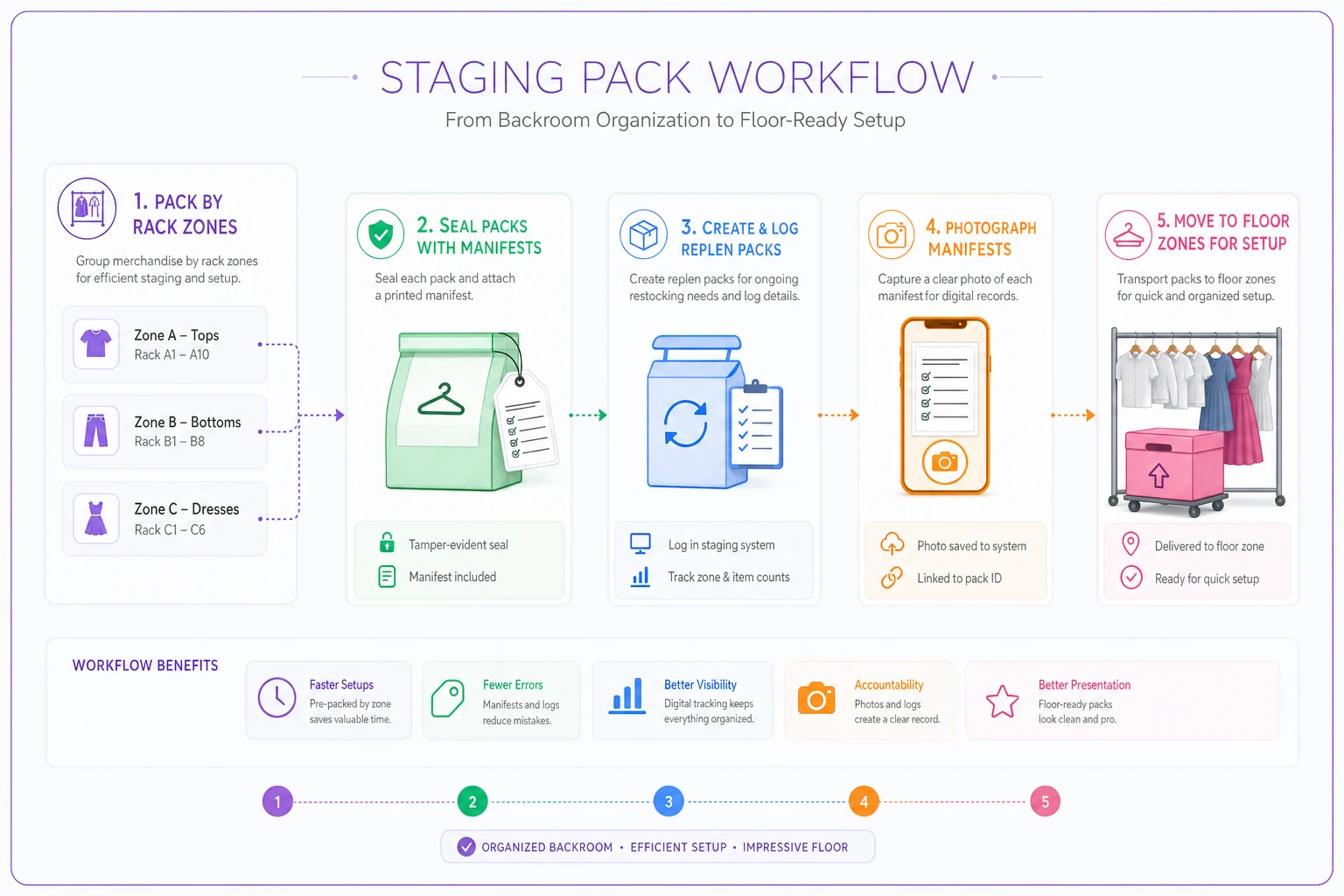
Here's a quick visual of the staging pack workflow to keep everyone aligned.
The discipline here mirrors what makes in-store setup fast — the same floor-ready thinking behind a solid in-store pickup and packing routine applies: if it's counted, labeled, and packed by function, the person handling it doesn't have to think, they just execute.
Worth calling out: the stores that reconcile fastest are always the ones with the cleanest opening counts. The manifest on the outside of the pack is worth more than any spreadsheet you build after the fact, because it's captured before the chaos, when the numbers are still honest.
The reconciliation problem: the part everyone skips
Here's how a pop-up actually ends. It's Sunday at 6pm, you're exhausted, you've got two carloads of leftover stock, and the last thing you want to do is count. So you don't. You toss the leftovers back into the main store's stockroom, mentally note "did pretty good," and move on.
Three weeks later your main store inventory is off, you can't figure out why, and you have no clean read on whether the pop-up actually made money after rent, transport, and staff time. The event that felt like a win becomes a question mark.
Post-event reconciliation isn't optional accounting. It's the step that tells you:
A post-event reconciliation template for small stores
Run this within 24 hours of teardown, before leftover stock disappears back into your main inventory. The core equation you're proving out is simple:
Opening count − Units sold − Units returned to main store = Shrinkage (should be near zero)
Here's the reconciliation table to fill in per SKU:
| Field | Where it comes from |
|---|---|
| Opening units | Staging pack manifest |
| Replen units added | Replen pack log |
| Total available | Opening + Replen |
| Units sold | POS report (filtered by PU- prefix) |
| Units returned to main | Physical recount at teardown |
| Variance | Total available − Sold − Returned |
| Gross revenue | POS |
| Discounts applied | POS |
| Net revenue | Gross − Discounts |
Then the event-level P&L, which is the number you actually care about:
-
Net revenue (from above)
-
− COGS on units sold
-
− Booth/space rent
-
− Transport (fuel, van rental, your time hauling)
-
− Staffing hours for setup, event, teardown
-
− Supplies (bags, signage, card fees)
-
= Event contribution
A variance of a unit or two per style is normal — a mis-scan, a sample, a size mix-up. A variance of 5+ units on a single SKU is a signal: theft, an open-price ring you can't trace, or a packing count that was wrong from the start. That's exactly the kind of shrinkage pattern that's cheaper to catch per event than to discover in a quarterly audit.
A real scenario with the numbers
A small women's apparel store ran a 2-day pop-up at a local market. They brought about 260 units across 14 styles, set the hero band at 24–40 (they brought 34 of their best-selling linen top), and used PU- prefixed SKUs mapped to their master catalog.
Booth rent ran roughly $400 for the weekend, transport and supplies another $150 or so, and two staff across setup, both days, and teardown came to around $600 in labor. Gross sales landed near $6,800, with discounts pulling net to about $6,100.
Where it got interesting was reconciliation. Their variance came back at 11 units unaccounted for — mostly on two accessory SKUs that had been rung through an open-price "Accessory $18" button during the Saturday rush. They couldn't tell whether those were mis-priced, given away, or walked. Eleven units at ~$18 is roughly $200 they couldn't explain, on an event where contribution after all costs was somewhere around $1,900.
That $200 hole didn't sink the event. But it changed the next one: no more open-price buttons, accessories got real prefixed SKUs, and the following pop-up came back with a variance of two units. Same setup, cleaner books, and — because the sell-through data was now trustworthy — a smarter buy. They cut two dead styles and deepened the hero band, and the next event's contribution climbed noticeably without bringing more total stock.
When a pop-up makes sense — and when it doesn't
When it makes sense:
-
You have a proven hero product with size depth you can spare from the main store
-
The event has foot traffic that matches your customer, not just any crowd
-
You can staff it without gutting your main store's floor coverage
-
You have time to reconcile within a day of teardown
When it's a bad idea:
-
You're bringing mostly unproven inventory and calling it "market testing" — that's an expensive way to guess
-
The transport and rent math eats more than half your realistic contribution
-
You're borrowing so much stock from your main store that you create holes at home. If you're regularly shuffling inventory between locations, the economics deserve the same scrutiny you'd give a store-to-store transfer decision — moving stock always has a cost, even when it feels free
Who should skip it entirely: if you can't produce a clean opening count and don't have a way to trace temporary SKUs back to your master records, don't run the pop-up yet. You'll sell things, feel good, and have no idea what it cost you. Build the tracking discipline first, then go.
Where the tracking gets easier
Reconciliation feels brutal because pop-up data lives in a different system than your store data. Your mobile POS knows what sold. Your main inventory knows what you own. Nothing automatically connects the two — so you become the connection, by hand, on a Sunday night.
This is where operational software with a bit of automation earns its place. When your temporary SKUs are prefixed variants of your master catalog, an inventory platform can pull the pop-up sales report, match it against the staging manifest you logged, and surface the variance per SKU without you rebuilding the math in a spreadsheet. The opening count you photographed becomes a record the system holds against the closing count. The event P&L — rent, transport, labor — sits alongside the sell-through so you're not stitching numbers together from four different places.
None of that replaces the discipline of clean SKUs and honest opening counts. Software can't reconcile what was never tracked. But once you've got the packing manifests and the SKU mapping right, letting a system handle the matching turns a two-hour reconciliation into a fifteen-minute review — and gives you trustworthy sell-through data to buy smarter for the next event.
The takeaway
A pop-up isn't a small store. It's a short, high-pressure inventory event where you can't reorder, can't fix a bad SKU setup mid-event, and can't recover margin you failed to track. The stores that come out ahead do three unglamorous things well: they buy to allocation bands instead of gut feel, they lock down temporary SKUs so every unit traces home, and they reconcile within a day while the numbers are still honest.
Do those three things and the pop-up stops being a gamble you feel good about and becomes a repeatable channel you can actually measure — and improve — every time you run one.
Ready to elevate your apparel business?
Join 2,000+ retailers using Werzly to streamline operations, increase sales, and deepen customer loyalty.