



Opening store two feels like a promotion until the numbers stop agreeing with each other. You've got a buying rhythm that works, a floor you understand, and a POS that reconciles cleanly at one location. Then a second store comes online, stock starts moving between the two, and about six weeks in you realize the style/color/size combos on your reports don't match what's physically hanging on the racks at either store.
That gap has a name in retail — inventory drift — and in a two-store setup it compounds faster than most people expect. The good news is that drift during an expansion is almost always a governance problem, not a technology problem. Most owners don't need a new system in the first 90 days. They need a handful of rules, a shared SKU list everyone actually uses, transfer SLAs with teeth, and a nightly reconciliation habit that catches small errors before they stack into something unfixable.
This is a playbook for exactly that window. Not a general expansion guide — a tight, 90-day governance structure for second store pilot governance small retailer teams who want store two to open without quietly breaking the counts at store one.
Why drift shows up in month two, not month one
The first few weeks of a second store usually look fine on paper. The opening order is fresh, everything's been received recently, and both stores are running off inventory that was set up carefully because everyone was paying attention.
Drift starts when the novelty wears off and the two stores begin behaving like independent shops that happen to share an owner. A customer at the new store wants a size you only have at the original location. Someone grabs it off the rack, throws it in a bag, and drives it over on their lunch break. No transfer record. No scan out, no scan in. That one shirt is now counted at both stores or neither, depending on who last touched the system.
-
Informal transfers that never get recorded because "it was just one piece."
-
Receiving shortcuts at the new store, where staff are still learning the process and skip steps under pressure.
-
Duplicate SKU creation, where the same vendor style gets entered twice with slightly different codes because two people set it up independently.
-
Markdown mismatches, where one store clears a slow style and the other keeps it at full price, so the same SKU carries two different "truths."
None of these are dramatic. That's exactly why they're dangerous. Each one is a rounding error you'd shrug off at a single location. Across two stores sharing stock, they accumulate into a count you have to physically recount to fix.
Start with one shared SKU list — and lock who can change it
Before you move a single unit between stores, both locations need to be working from the same product list. Not similar lists. The same list.
Take control of your clothing store operations.
Werzly helps you manage stock, process orders, and engage customers effortlessly.
- Unified inventory and order management
- Automated customer notifications
- Sales and stock analytics
No credit card required
The most common failure here isn't missing products — it's near-duplicates. Store one has a style entered as WJKT-NVY-M. Store two's new hire enters the same jacket as WINTJKT-NAVY-MED. Now your transfer reports, sell-through, and reorder triggers all split across two codes that represent one physical item. Your bestseller looks like two mediocre sellers, and you under-buy it.
The fix is boring and it works: one master SKU list, one person who can add or edit SKUs, and a rule that nobody else creates product codes during the pilot. Everyone else requests additions through that single owner. If you've already built a clean product foundation, this is the moment it pays off — if you haven't, the groundwork in a single source of truth for SKUs, sizes and vendors is worth locking down before store two opens, not after.
-
One master list both POS instances read from.
-
One SKU owner (usually the buyer or owner) with edit rights.
-
A 24-hour SLA on new-SKU requests, so staff aren't tempted to improvise.
-
A weekly duplicate scan — sort by vendor style and description, eyeball anything that looks like a twin.
-
No markdown goes live at one store until the price change is reflected in the shared list for both.
That last rule prevents the quiet version of drift where the same SKU carries two different prices and your margin reports stop meaning anything.
Transfer SLAs: the piece everyone skips and regrets
Transfers are where most of the physical drift happens, and they're also the easiest thing to govern because the rules aren't complicated — you just have to actually enforce them.
The core principle: no unit moves between stores without a recorded transfer, and every transfer has a clock on it. A piece that leaves store one but hasn't been received at store two within the SLA window is "in limbo," and limbo inventory is drift waiting to happen. It's counted somewhere it isn't, or nowhere at all.
| Transfer type | Trigger | SLA to ship | SLA to receive/scan in | Owner |
|---|---|---|---|---|
| Customer-driven (single unit) | Customer wants size/color at other store | Same day | Within 24 hrs of arrival | Sending store lead |
| Replenishment (multi-unit) | Low stock on a proven seller | Within 48 hrs | Same day as arrival | Receiving store lead |
| Balancing (slow mover) | Rebalance before markdown | Within 5 business days | Within 24 hrs | Buyer |
| Emergency (hot item) | Stockout on top seller | Same day | Same day | Either lead |
Two rules make this template actually work instead of becoming a dusty document:
-
Every transfer is scanned out and scanned in. No manual quantity typing. If it wasn't scanned, it didn't happen, and the count is wrong until someone fixes it.
-
Anything past its receive-SLA shows up on a daily exception list. A transfer that's been "in transit" for four days between two stores in the same city is a red flag, not a routine entry.
If you want the deeper economics behind which transfers are even worth making — because moving a $19 top across town for one sale can cost more than the margin — the decision rules in the store-to-store transfer playbook pair directly with these SLAs. Governance tells you how to move stock cleanly; the economics tell you whether you should.
The nightly reconciliation habit
A single store can usually get away with reconciling weekly or at month-end. A two-store pilot cannot, and the reason is timing. At one store, an error you find at month-end happened somewhere in the last 30 days and you can usually reconstruct it. Across two stores sharing stock, a 30-day-old discrepancy is nearly impossible to trace because nobody can remember which of a hundred informal moves caused it.
Nightly reconciliation during the pilot isn't a full count. It's a fast variance check that answers one question: did today's movement reconcile? You're comparing what the system says moved — sales, transfers in, transfers out, receiving — against what should balance out. When it doesn't, you catch it while the day is still fresh in everyone's memory.
-
Pull the day's transfer exception list — anything shipped but not received.
-
Check receiving variances — did any PO get received with a quantity that doesn't match the ASN or packing slip?
-
Scan the negative-on-hand report — any SKU showing negative inventory is a scanning or transfer error, full stop.
-
Confirm sales-to-inventory ties out — units sold should equal the drop in on-hand for those SKUs.
-
Flag anything unresolved for the buyer to chase the next morning.
The value isn't in any single night. It's in never letting an error age more than 24 hours. Small drift is cheap to fix. Thirty-day-old drift means a physical recount.
A quick visual of the nightly reconciliation workflow can help teams run the steps consistently.
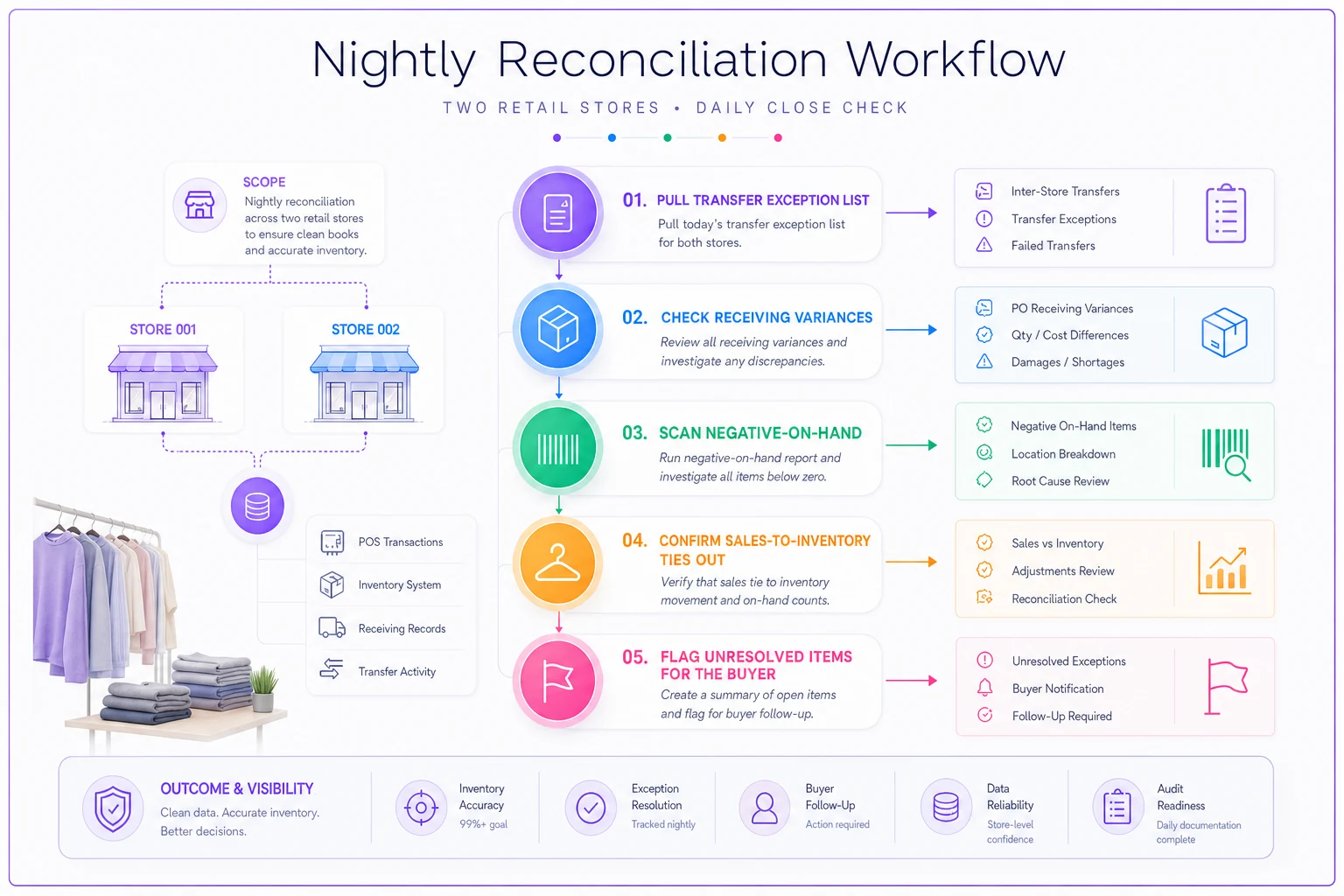
This is also where the right system earns its keep quietly. A platform that flags negative on-hand, surfaces stuck transfers, and pushes an exception list automatically turns the nightly check from a hunt into a two-minute review. You're not building reports — you're reviewing the handful of things that actually broke. Spend your attention on exceptions, not on manually reconciling rows that already balanced.
One-page dashboards that keep both stores honest
During a pilot you don't need analytics. You need a single page, checked daily, that tells you whether drift is happening. If a metric doesn't help you catch drift or decide a transfer, it doesn't belong on the pilot dashboard.
-
Open transfers past SLA — the single best early warning for drift.
-
Negative on-hand count — should always be zero; anything above is an active error.
-
Duplicate SKU flags — near-twins caught in the weekly scan.
-
Receiving variance count — POs received with mismatched quantities this week.
-
Shared-SKU price mismatches — same SKU, two prices across stores.
Five numbers. If all five are clean, your counts are probably clean. When one spikes, you know where to look before it spreads to the other store.
The mistake owners make here is building a dashboard that tracks performance — sales, conversion, traffic — during the pilot window. Those matter, but not yet. In the first 90 days your job is data integrity, because every performance number you'll want later is only as trustworthy as the counts underneath it. Measure the plumbing first.
A realistic 90-day scenario
A two-store women's apparel shop — one established location doing solid volume, a second opening about 15 minutes away — ran their first 60 days without transfer governance. Staff moved pieces between stores informally whenever a customer asked, which felt like great service at the time. By week seven, a spot count on their top denim styles was off by roughly 30–40 units across both stores combined, and nobody could explain where they'd gone. Some were double-counted; a handful had moved in informal transfers that were never recorded.
The fix wasn't dramatic. They locked the SKU list to one owner, put the transfer SLA table above on the wall behind each register, and started a 15-minute nightly reconciliation per store. Within about three weeks the negative on-hand report was hitting zero most nights, and stuck transfers — which had been running five or six open at a time — settled to one or two that cleared the same day.
The real payoff showed up at the next buy. Because their denim SKUs were no longer split across duplicate codes and the counts actually matched the floor, they could finally see which washes were genuinely selling versus just appearing to sell across two half-right records. They reordered with confidence instead of guessing. The governance didn't just fix the count — it fixed the decisions that depended on the count.
When this level of governance makes sense — and when it's overkill
Do this if you're opening a second store that shares stock with your first, especially if the two locations are close enough that informal transfers are tempting. Proximity is what makes drift so easy; the 15-minute drive is the enemy of clean records.
Scale it back if your second location is a genuinely separate concept — different product, no shared inventory, no transfers between them. In that case the two stores barely interact at the SKU level, and heavy transfer governance just creates busywork. You still want the shared SKU list and nightly reconciliation per store, but the transfer SLAs matter far less.
Don't bother with the full nightly cadence if you're running a short pop-up or a temporary second space for a season. The timelines are too compressed for drift to accumulate the way it does in a permanent expansion, and a weekly check usually covers it.
The point of a 90-day pilot is that it's time-boxed on purpose. Run it tight for a quarter, prove the two stores can share stock without the counts falling apart, and then relax the cadence — nightly becomes a few times a week, the dashboard adds performance metrics — once you actually trust the plumbing. Governance this strict isn't forever. It's the scaffolding you need while the second store is still learning to stand.
The habit that actually prevents drift
Everything above comes down to one operating principle: during an expansion, small errors must be caught the same day they happen. The SKU list prevents duplicates at the source. The transfer SLAs make sure nothing moves off the record. The nightly reconciliation catches whatever slipped through before it ages into something untraceable. The one-page dashboard tells you at a glance whether the whole system is holding.
A second store doesn't break your inventory because expansion is inherently chaotic. It breaks because the informal habits that were harmless at one location — the quick transfer, the skipped scan, the duplicate code — suddenly have a second store to compound against. Put the governance in for 90 days, keep it boring, and store two opens without quietly unraveling the store you already trust.
Put the governance in for 90 days, keep it boring, and store two opens without quietly unraveling the store you already trust.
Ready to elevate your apparel business?
Join 2,000+ retailers using Werzly to streamline operations, increase sales, and deepen customer loyalty.